


Spot available nights between stays
Stay operations, Occupancy calendar
Plan stays. Check room moves.
Plan arrivals, departures and available nights in one view. When a guest asks to move rooms, check occupancy and room blocks before confirming the change.
Occupancy calendar
Guest, room and status on the booking.
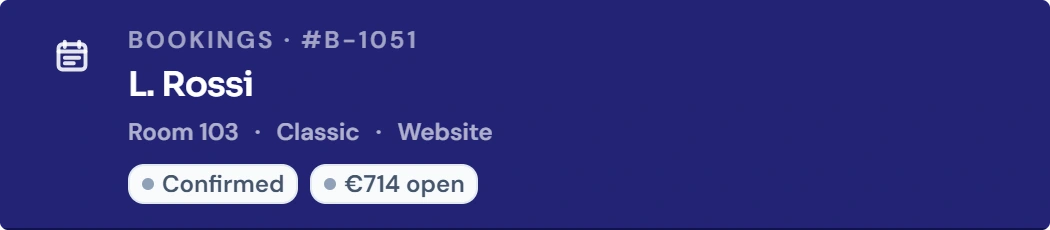
B-1051 is L. Rossi’s booking for room 103. Open it from the calendar to check the guest, room allocation and booking status together.

Occupancy calendar
Drag a booking to move it, then confirm
Check occupancy before changing rooms
Account for room blocks on the selected dates
Open an arrival from its booking
See cleaning status alongside occupancy
How it works in your hotel
- 01Day, week, two weeks, month or custom period
- 02New booking with one click on a free cell
- 03Change room and dates by dragging
- 04Conflict check against occupancy and room blocks
- 05Filter by category, occupancy, status and tags
- 06Your own room order, e.g. by walking route
- 07Your hotel’s status colours and adjustable density
- 08Block rooms straight from the calendar
Four practical jobs in daily hotel operations.
Arrival day at 3 pm
Reception sees all of today’s arrivals, checks which rooms are already ready and opens check-in straight from the booking bar.
Guest would like a quieter room
The booking is dragged to room 312. STRYK shows the old and new room, checks occupancy and only saves once you confirm.
Water damage in room 108
Room 108 is blocked for three days. The calendar shows exactly which nights are unavailable.
Gaps before the season starts
There are single free nights between stays. Compare room allocations to see whether moving a booking could create a longer available period.
Common questions: Occupancy calendar
What does the STRYK occupancy calendar show?+
It connects every real room with its bookings, free periods, blocks and operational states. Reception and management therefore see not only occupancy but also the next sensible action.
Which time views are available?+
The team switches between day, week, two weeks, month and a custom date range. The two-week view is especially useful for daily reception work, while the month reveals longer-term gaps.
When does the week view start?+
Week and two-week views start on Monday. This matches normal hotel planning and avoids jumping into the middle of an operating week when changing views.
Do dates remain correct around time zones?+
STRYK treats calendar dates as local property days. Arrival, departure and week start are therefore not accidentally shifted by a day through an unsuitable time-zone conversion.
How does the team recognise booking status?+
Booking bars use the centrally defined state and property colours. Confirmed, checked in, checked out, cancelled and no-show remain distinguishable without opening every booking first.
How is today highlighted?+
A visible today marker anchors the calendar in live operations. Arrivals, departures and overdue actions can therefore be prioritised around the actual day.
Can the calendar be searched and filtered?+
Yes. Rooms, bookings and guests can be searched; the team can also narrow by room category, occupancy, room state and room tag. This reduces a large occupancy plan to the workspace that matters now.
How can rooms be sorted?+
Options include room number, category, room state, guest count and available or occupied rooms first. Each shift can read the same data in the order most useful for its work.
Can the property define its own room order?+
Authorised users can define an individual order for hotel operations, for example by building wing or walking route. Without it, the clear room-number order remains available.
How is a new booking created from the calendar?+
Clicking a free cell opens booking creation with room and date already selected. This avoids repeated entry while availability, guest, rate plan and price are still fully checked before saving.
What happens when a booking bar is opened?+
STRYK opens the correct stay with guest, dates, room, source, payment state, notes and operational actions. The team works on the real record rather than a detached calendar copy.
Can a booking be moved by dragging?+
Yes. The team drags the stay to the desired room and date. Before changing it, STRYK shows the new assignment in a confirmation dialog and saves only after deliberate approval.
Which conflicts does STRYK check before moving?+
The target room is checked against existing bookings and active room blocks across the entire new period. A conflict identifies the room and cause and blocks confirmation instead of creating double occupancy.
Can a stay be extended or shortened directly?+
Authorised employees adjust arrival or departure on the booking bar. STRYK again checks the new period for occupancy and blocks and requires confirmation before saving.
Are changes executed immediately without confirmation?+
No. Room or date changes first show the starting point, target and any conflict. This short control point protects a busy reception from accidental moves.
How does STRYK handle changes to past stays?+
Historical changes are an exception and require a traceable reason. Timestamp, user context, booking number and justification remain available for later review.
Are room blocks visible in the calendar?+
Yes. Active blocks remain visible on the affected room row regardless of optional information filters. Maintenance or renovation therefore cannot accidentally appear as sellable free time.
Can availability be controlled directly from the calendar?+
The calendar opens central availability management for overview, new block and active blocks-optionally already focused on the selected room. The authoritative rule remains in shared availability.
How does the calendar work with housekeeping?+
The operational room state appears directly on the room row. Check-in, checkout and housekeeping updates use the same state, so a ready, occupied or dirty room is not managed in two separate worlds.
Which permissions apply in the calendar?+
Reading, editing and critical booking actions are separated. Housekeeping and availability actions follow their own permissions. Employees therefore see and change only what their job requires.
Can colours and density be adapted to hotel operations?+
Yes. The property maintains state colours centrally and chooses suitable calendar density and room-state display. Meaning remains consistent throughout the property even when more or less information should fit on screen.
Which additional information can be shown?+
Depending on the job, STRYK shows booking source, payment state, housekeeping, notes, warnings, guest and room tags or booking numbers. The team chooses the useful layer without losing the occupancy plan itself.
Does the occupancy calendar cost extra and how can you try it?+
The calendar is part of the single STRYK offer, with no setup fee or hidden calendar module price. In your demo access you try it yourself with rooms, bookings, gaps, blocks and a controlled room change.
Could Occupancy calendar work for your hotel?
14 days free. All STRYK core apps included. No setup fee; optional AI modules are separate.
